
Technical issues
How to Disable Memory Integrity (Core Isolation / HVCI)
Last updated 1 min read
Memory Integrity, also called HVCI (Hypervisor-protected Code Integrity), is part of Windows Core isolation. When it's on, it stops the loader from starting, so it needs to be off.
Open Core isolation. Click
Start, typeCore isolationand open the Core isolation result. This opens Windows Security.Turn off Memory integrity. Set the Memory integrity switch to
Off.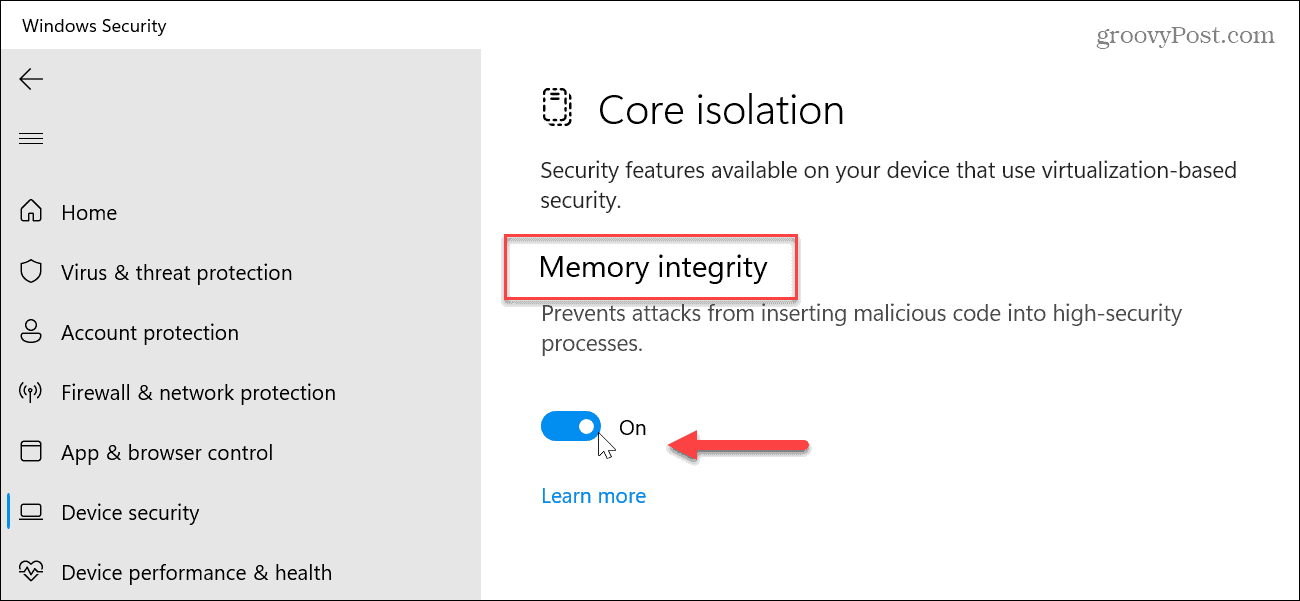
Restart your PC. The change only takes effect after a reboot.
Note
If the switch is greyed out or turns itself back on, an organization policy or a driver may be enforcing it. Make sure you're signed in with a local administrator account, then try again.
Next step
Memory Integrity is one of the loader requirements. If you haven't already, also disable Windows Defender.