
Technical issues
How to Disable the NVIDIA App Overlay (GeForce Experience)
Last updated 1 min read
The NVIDIA App replaced GeForce Experience. Its overlay (recording, instant replay and performance stats) draws on top of every game and can stop the cheat menu from showing.
Open the NVIDIA App and click the Settings gear in the left sidebar.
Make sure the Features tab is selected.
Set NVIDIA Overlay to
Off.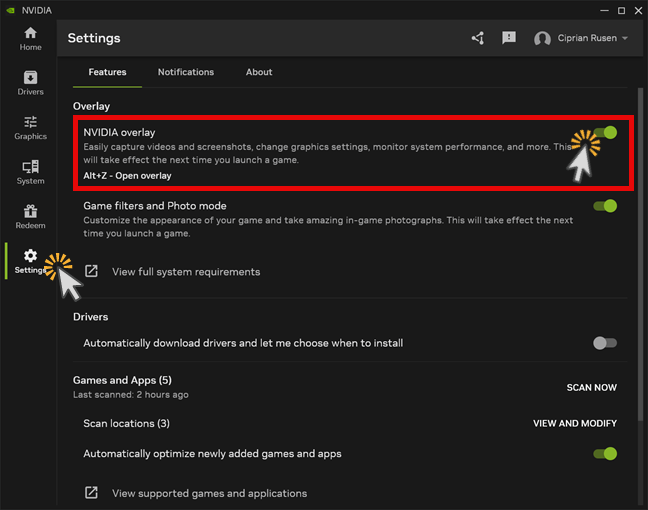
Note
Still on GeForce Experience? Open it, click the gear icon and switch off In-game overlay under General.
Disable the other overlays too
Also turn off Discord, Steam and the Xbox Game Bar. Using an AMD card instead? See the AMD Adrenalin overlay. For everything else, see the troubleshooting guide.