
Technical issues
How to Disable Hardware-Accelerated GPU Scheduling
Last updated 1 min read
Hardware-accelerated GPU scheduling (HAGS) lets the graphics card manage its own memory. It can help performance, but with some drivers and games it causes overlay and rendering problems. The steps are the same on Windows 10 and 11.
Right-click the desktop and choose Display settings.
Scroll down and click Graphics.
Click Change default graphics settings. On newer Windows 11 builds, open Advanced graphics settings instead.
Set Hardware-accelerated GPU scheduling to
Off.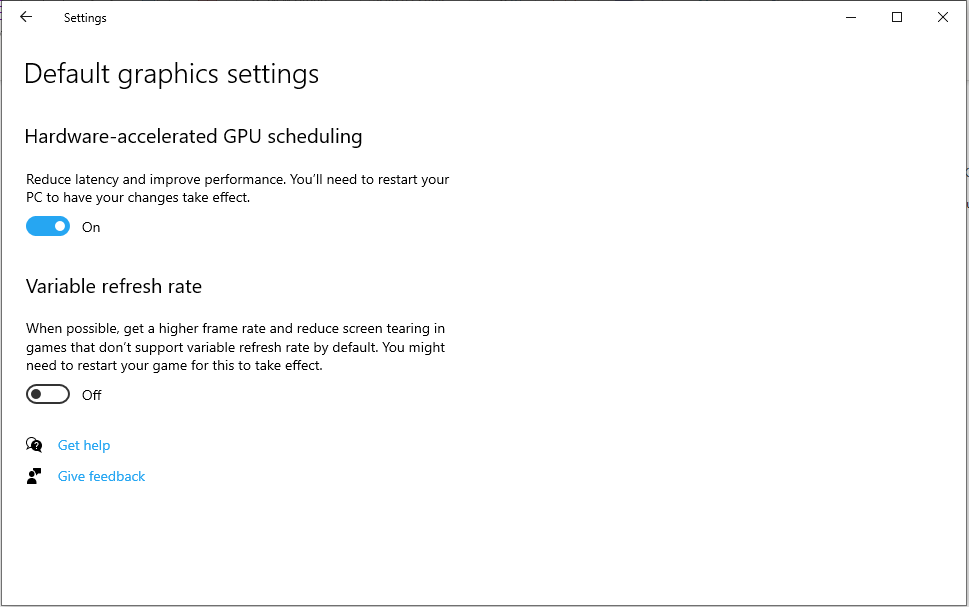
Restart your PC. The setting only applies after a reboot.
Related tweaks
Also see Game Mode and Fast Startup, or go back to the troubleshooting guide.